Starting My Home Automation Experiment
This post is part of the My Home Automation Lab series
- Starting My Home Automation Experiment

And some time ago I installed the FIBER1 in my home and I want to use in the best way, so I start to rework all my local network and I think about adding some home automation.
Xkcd - Virtual Assistant
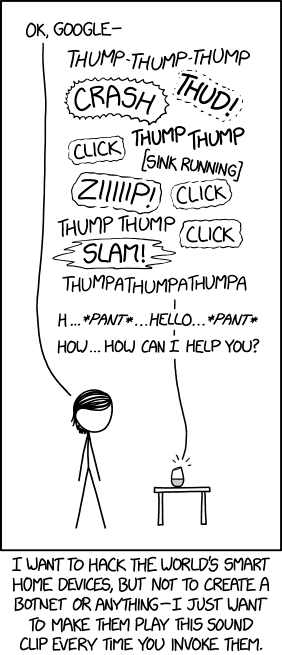
If you ask it to please turn off that feature, it apologizes a whole bunch and promises to try to be quieter, then switches to a slightly lower-volume version of the clip with "sorry!" after the louder sounds.
What do I need?
First I search for understand what I need to have for build my personal home automation. So serching on the web I found I need:
- A brain/core/server for coordinate all the stuffs
- A software for the brain, for the automation and other stuff
- A router for adding the brain to the network for update and other stuff
- Dongle/sensor/tech for connectivity with the sensors and smart stuff (one for protocol)
- The smart stuff (light bulb, sensor, timer, endpoint api…)
So I need to choose which protocol I want in my home… And I don’t know…
So I change the point of view:
- I want to use good smart stuff but I don’t want to pay too much
- I want something Open Source so I am not bind to a company
- I want something offline or/and on MY HOME SERVER
The protocols
Searching for the protocols I choose Thread2 and Zigbee3. One reason is because they are the most used protocol for communication and more easy to find online (Amazon) and offline (Ikea and othe local shop).
For starting I will implement only Thread because the more easy tech for me are all Matter over Thread so I start with Thread.
From the infographic I found, I need to implement Matter4 also because Matter is the top stuff for an Home Assistant.

The software
Now I want a software, Open Source, which I can support Thread and Matter (and also Zigbee) and I found a software (Open Source) wich support all I need: Home Assistant5.
It support Matter6, Thread7 and Zigbee8 and I can put it in a RaspberryPi or other server.
Hardware
So I start to make a list of what I have and what I need. Some things I buy online, some things come from some tech market and some come form the shoes box of my old stuff…
I only write about the real things but if I use cable or other “standard stuff” I don’t write about it. So yes I bought some usb extention and some network cable but they aren’t important for this post.
Core/Brain Stuff
First I need the Brain for the project

From what I read in the Home Assistant5 documentation I need some type of server with some gadget connected to them.
So I search and got a RaspberryPi 4B9.

I also bought a microSD with 64GB of memory (I am on a budget for this project) as an Hard Disk for the “server”.
Searching in my closet and in some shoes boxes I found a case10 for RaspberryPi with active cooling system (and LGB light)
So I flash the microSD with the Home Assistant software. Thanks to the Raspberry Pi Software11 choosing the right iso and flash it in the SD was a walk in the park.
After the flashing I set it up and add to my local network and check for update.
So the brain is ready!
Sensor form Ikea
I went to Ikea for some stuff and some Swedish meatballs and I came back with an Ikea Alpstuga12.

It is a timer, air sensor with CO2 and PM2.5 sensor and output all of them and an Air Quality value.
The only bad thing about it is the color but for the price I don’t complain.
So after coming home I found it didn’t work.

As is the RaspberryPi 4B do not support Thread or Zigbee without some type of specialized antenna… I was understanding that the software use the wifi module of the RaspberryPi as a Zigbee/Thread emitter/reciver but no so I search on Amazon for the dongle for Thread.
Antenna
I bought a Usb dongle13 for connecting the RaspberryPi and the other gadget in the house (for now only the Ikea one)

This antenna is a little special: you can flash it for changing it form Zigbee to Thread and vice versa so I start to config it.
Setup the Antenna
First I flash the antenna. I need to port from Zigbee to Thread14 and with the online tool it was so easy I thought I did something wrong.
After this I connect the dongle and start to config the Home Assistant.
First I need to have installed Thread from “Add Integration” and it showed an empty list of device. This is correct because I didn’t have a Thread router installed.
So we add a OpenRouter. How? Installing from the officials app of mine Home Assistant.

After this I edit the config in this way (the device was auto-finded) and I set this for my device. 15

For checking if all was ok I went and seach in the log for the OpenThread for a specific line.

After this I went to check if the Thread integration showed the Ikea sensor and it didn’t show… Why? Because I am STUPID.
Setup the last little things
Alpstuga (my air sensor) is not Thread, is Matter over Thread, so I need to add the thing with the Matter integration. And with this last integration the system worked!

I am happy of this system? No. Why? I have the wrong time on the Alpstuga.
This thing I don’t understand so I search online for understand how can I fix the time on the device.
I find this is a common problem with the Alpstuga device and someone made a Hacs16 plugin17 wich add a cron and a button for sync the Home Assistant’s clock. I also add the plugin for integrate my Playstation Network in my Home Assistant18.
Conclusion
For now this is what I had done but I want to have automation (for now I don’t have any) and some stuff for lower the gas bill so there will be more post about my smart home.
This post is part of the My Home Automation Lab series
- Starting My Home Automation Experiment
Reference this post
Please reference this post with a link to this page. I prefer to be called Fundor333 (he/him) or Fundor333' Blog.
Comments
To reply to this post, you can send a Webmention or you can toot me at [email protected]
With an account on the Fediverse or Mastodon, you can respond to this post. Since Mastodon is decentralized, you can use your existing account hosted by another Mastodon server or compatible platform if you don't have an account on this one. Known non-private replies are displayed below.
Learn how this is implemented here.